Create your own Internet Radio Station with MediaMaster

MediaMaster is offering you unlimited network web space, where you can store all you audio tracks and access them from any computer connected to Internet or from a streaming player.

Once your tracks are uploaded, you can create and manage playlists, rate individual songs, and share your music with others with embeddable widgets for blogs, Web sites, and social networking profiles.

You can even create your own streaming network radio station on the basis of your collection, and allow visitors of your personal blog or your profile on social networking sites to listen it. You have a complete control over the musical tracks that you would like to share with your virtual friends.

You should not be worried about copyright issues as neither the widget or radio subscriptions actually give people copies of your music, it's all streamed. And, there's no way for them to actually download the music.


MediaMaster

If the proposal sounds interesting, sign in: http://www.mediamaster.com/

For those who prefer a visual presentation, I am attaching a small video clip:

It should be cool to give your blog visitors one more reason to visit your site!

Baywords: censorship-free blogging community from Pirate Bay!

If you know, what torrent means, most likely, you are familiar with Pirate Bay, one of the biggest BitTorrent trackers, the online file sharing community, distributes torrents that not always point to licensed copies of copyrighted material. In some countries, offering such torrents might be illegal as copyright violations, but in Sweden, where company operates, the torrent trackers are not a subject of legal prosecution.

Pirate Bay recently came to the community focus in relation with the music industry lobby group - The International Federation of the Phonographic Industry (IFPI) - going to court to force Danish ISP Tele2 blocking access to the enemy website accusing it of aiding and abetting copyright infringement. In return, Pirate Bay is seeking damages from IFPI for blocking access to its website; even thou the block generating a very limited negative effect on the company popularity and operations.

Devoted to the free information flow on Internet, The Pirate Bay has established an uncensored image-hosting site call BayIMG and is planning to open an uncensored video-hosting community. While the image-hosting is censorship free, host kindly requests not to put porn images on it, using available alternative services instead.

As logical extension of its policy, Pirate Bay has launched a blogging service where bloggers won’t have to fear censorship, Baywords (http://baywords.com/), based on the Wordpress blogging platform.

The Pirate Bay team explains:

“We’re proud to present a new service - baywords.com. Because of the need of freedom of speech and secure hosting facility of the words being said we could not agree to how people behave towards bloggers. Many blogs are being shut down for uncomfortable thoughts and ideas. We will not do that. Our goal is to protect freedom of speech and your thoughts. As long as you don’t break any Swedish laws in your blog, we will defend it”.

For people who are considering moving their Wordpress or Blogger account over to Baywords, importing is pretty straightforward and compatible with all the popular blog platforms.

Additional Reading:

http://www.theregister.co.uk/2008/04/16/piratebay_sues_music_industry/

http://www.news.com/8301-10784_3-9920714-7.html?tag=nefd.top

http://www.webpronews.com/topnews/2008/04/16/pirate-bay-opens-uncensored-blogging-service

http://torrentfreak.com/baywords-pirate-bay-blog-080416/

http://www.techcrunch.com/2008/04/16/the-pirate-bay-launches-uncensored-blogging-service/

Blog to Death! Is Blogging a Health Hazard?

Blogs are a curious phenomenon. Like modern poetry, they have more writers than readers…those who have lost their health in their determination to sate their readers’ interest are, after their fashion, martyrs to a worthy cause.

Telegraph

TubeImage.com

Three well-known tech bloggers have had heart attacks since December, and a story in the New York Times suggests that the high stress of blogging may be a cause. Many obsessive bloggers complain of weight fluctuation, insomnia and exhaustion. "There is no official diagnosis of death by blogging, and the premature demise of two people obviously does not qualify as an epidemic," said the newspaper. "But friends and family of the deceased ... say those deaths have them thinking about the dangers of their work style."


Even amateur and occasional bloggers know what I mean. The urgency to express an original thought, to think it over, and to post it first, before everyone else, is a permanent driver. There is and permanent strain to find interesting topics of discussion and appealing ideas that will resonate with readers. Most important, it is the constant pressure to drive page views that is burdensome.


It is impossible, of course, to know whether blogging played a role in the heart attacks of bloggers Russell Shaw, of ZDNet, Marc Orchant of blognation, and Om Malik. “The longstanding observation that rates of coronary heart disease vary markedly among occupations-more than can be accounted for by conventional risk factors for coronary heart disease-has generated a quest for specific components of work that might be of aetiological importance,” as a review of the literature on psychosocial factors and cardiovascular disease put it in the British Medical Journal a few years back.


So, can blogging be included in the high-risk occupations list? I doubt so. Quoting Larry Dignan, who also has been interviewed for the Times story, but did not support the cases generalization outlook, so his opinion was not counted: “Yes, blogging is stressful. Yes, it can be insane. But is it any worse than being a corporate lawyer? How many of those folks dropped in the last six months? How about mortgage brokers? Hedge fund traders? FBI agents? Any job where you gnash your teeth together? We write for a living, yap all day and don’t have to wear suits. You could do worse than blogging”.


So, it is opinion of the professional blogger, whose financial state depends on the blog popularity. For most of you, it is just mostly fun, and slightly income. Do not get obsessed by blogging, do not let it to hook you up. There is life in the Real World as well. Look around! Your friends and families need you even more than your readers! Do not Blog to Death!


Sources and additional reading:

http://www.nytimes.com/2008/04/06/technology/06sweat.html?_r=1&oref=slogin

http://www.informationweek.com/blog/main/archives/2008/04/blogging_as_fas.html

http://www.telegraph.co.uk/opinion/main.jhtml?xml=/opinion/2008/04/07/dl0703.xml

http://blogs.wsj.com/health/2008/04/07/can-blogging-kill-you-we-dont-think-so/

http://blogs.zdnet.com/BTL/?p=8389

How to Add Page Elements to Blogger Header

Adding page Elements to Blogger Blogs

When you create a Blogger Blog the template comes with a pre-defined number of page elements. If you would like to increase the number the following step by step tutorial will show you how. This lesson will deal with adding more Page Elements to the Header section of your Blogger Template.

Update Oct 2008 - Since this post was written Blogger has changed the name "Element" to "Widget". Don't be confused as "widget" is the same thing as "element".

Always download a backup before making changes.

The screenshot below shows a standard Blogger Minima Template.

Click all images to enlarge.


As you can see there is only one element available for the Header section on top.

This is how you can add more.

Under "layout" click "Edit HTML".

Click the "Expand Widget Template" Box.


Scroll down until you come to the section that looks like this;


As you can see the "maxwidget" is set to 1 - this means that there is only one widget (element) available for use in the Header. You can change this to whatever amount you like. I am going to change it to 3.

After making the change be sure to change the "showaddelement" to "yes" so that you will see the option to add another element on the "layout" page.


Click "Save Template" and you are done.

Your "Layout" - "Page Elements" page should now look like this.


And that is how you can add or modify the page elements in Blogger. I will show you how to do this with the other sections in future posts but you may want to try it on your own. The process is the same for all the sections - Main Wrapper, Sidebar Wrapper and Footer.

Cheers,

Griz

Be carefull: Blogging might be dangerous!


Twenty-two-year-old Lisa called in sick one Friday afternoon. But she wasn’t really sick. She was planning to start the weekend early by going to the beach with her friends. Days later, she posted pictures of the outing on her blog. Someone in her office found the link. Soon, she was called to her boss’ office. She didn’t lose her job, but she got into a lot of trouble.
Eighteen-year-old Anne enjoys an independent life. Both parents are in the US. She blogged freely about her misadventures—drunken nights out, failed tests, her penchant for bad boys. She thought her blog was being read only by her friends.
But a concerned relative sent the link to her parents who immediately jumped to action, calling Anne up and threatening to fly her to the US where she could be put under their watch. Anne is still in the country but has deleted her blog.
The two girls have experienced blog backfire. Things they posted online ended up working against them.
Make sure it doesn’t happen to you, too. Here are some things to think about when you blog.
1. You don’t know who is reading your page.
Unless your entries are locked and you have total control over who has access to them, you’re never sure who is reading your entries. Your parents, your teachers—they’re all just a google search away from unlocking your deepest thoughts.
2. What you post can make or break your career.
While some people have gotten book deals after building a huge blog readership, most bloggers need to realize that employers have started using Google searches as a tool to scan job applicants.
3. Will your post hurt anyone?
It is easy to vent online your anger with a friend or a family member. But let the anger simmer before hitting the “publish” button. Sleep on it, think it over because once it’s online, it will not be easy to get rid of—not with the cache features of online searches.
4. Can your entries be lifted and used against you?
Your blog entries may be lifted anytime by anyone who knows how to highlight and press Ctrl and C. Your photos may be stolen as easily and defaced, like some have been on gossip blogs. It may be smart to add javascript that prevents readers from right-clicking on your page. It’s not total protection, but it may save you from the less-techie lurkers.
5. Will your entries attract the wrong kind of people?
Most blog readers are kind. They leave comments, they send you e-mails and sometimes, you even find people you can be friends with. But some of the more popular bloggers have had problems with blog stalkers. High internet traffic is a good thing, but not when it leads to scary encounters.
Source:
http://showbizandstyle.inquirer.net/you/blogaddicts/view/20080401-127751/Yes-blogs-can-ruin-your-life

How to Change the Width of Blogger Blogs

Modifying the Width of Your Blogger Blog

Here is a quick step by step tutorial on how to change the width of your Blogger Blog.

I have provided screenshots of each step - just follow along and you shouldn't have any problems.

Before you start create a backup of your current blog just in case there is a problem.

I will show you how to change the standard template so that the width is the same as this blog. This basically entails 4 things. First you increase the width of the Outer Wrapper and then you increase the width of the Header and then the two columns inside the outer wrapper. This would be the Post column and then the Sidebar column. Lastly you increase the width of your Footer.

You can click on all images to enlarge them.

Step One

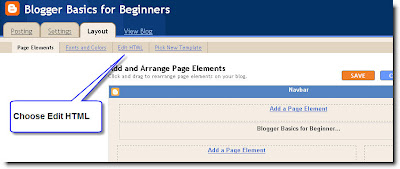
Open "Layout" and choose the "Edit HTML" option.


Note: I am using the Minima Template for this demonstration - if you have a different template just find the appropriate section - the steps are the same.

Step Two


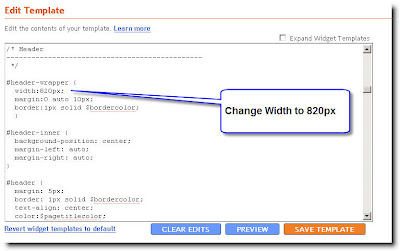
Scroll down to the Header section and change the Header Wrapper width to 820px


Step Three

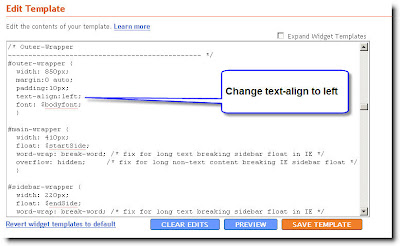
Scroll down to the Outer Wrapper section and change the width to 850px


Step Four

Change the Outer Wrapper "Text-Align" to "left"


Step Five

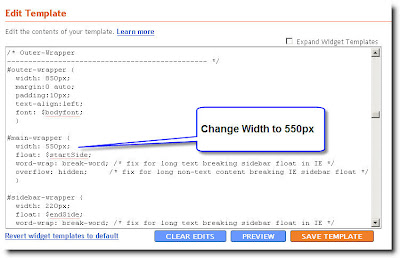
Change the Main Wrapper width to 550px - this is located right below the Outer Wrapper section. The Main Wrapper is your Post Column.


Step Six

Change the Main Wrapper "float" to "left".
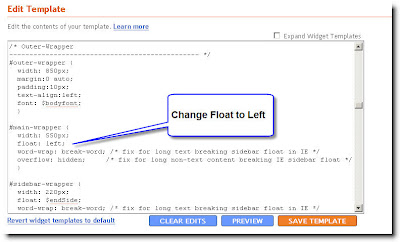


Step Seven

Change the Sidebar Wrapper width to 270px. The Sidebar Wrapper is located right below the Main Wrapper.
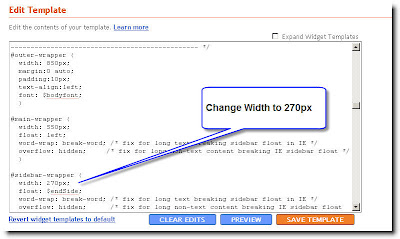


Step Eight

Change the Sidebar Wrapper "float" to "right".
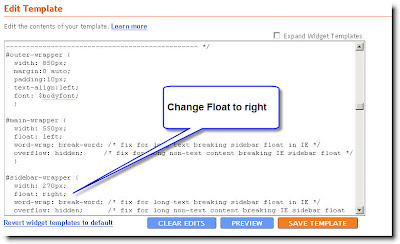


Step Nine

Scroll down to the Footer section and change the width to 850px.
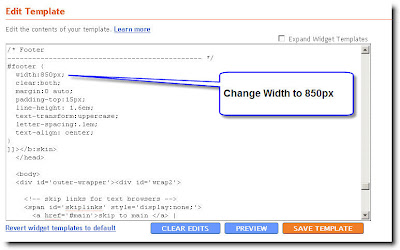


Click "Save Template" and you are done.

This is what you have just done;

You widened the size of your usable blog space to 850px. ( The Outer Wrapper )

Inside the Outer Wrapper you have changed the width of the Three Sections that make up your blog.

1) The Header section - 820px

2) The Main Wrapper section which consists of your two columns;

- The Post Column - 550px
- The Sidebar column - 270px

3) The Footer section - 850px

You will notice the Header section is 30px less than the Outer Wrapper.

The two columns add up to 820px - also 30px less than the Outer Wrapper.

I have made the Footer the same size as the Outer Wrapper.

You can play with different widths but be sure that none of the other wrappers add up to more pixels than what you set the Outer Wrapper at. Your two columns should be at least 30px less than the Outer Wrapper so that they have a space between the two columns. The Header should be a little less as you don't want it bleeding right to the edge. (It just looks better) The Footer can be the same width as the Outer Wrapper.

Cheers,

Griz

site visitor